Executing SampleApp QNN C++ api model on Ubuntu

I am trying to execute a model using QNN C++ api on htp backend following the SampleApp docs.
However, the documentation is quite confusing regarding which files must be placed where on the target, and after following the steps, my program exits silently with no errors, warnings, or logs.
Check the steps I follow and tell me if I am missing something.

Sdk versions and Host environment.

  • On Ubuntu 22.04(x86_64) host
  • Qairt 2.37.1.250807
  • Hexagon_SDK 4.2.0.3
# set the evn vars and build for board on host
source ${QNN_SDK_ROOT}/bin/envsetup.sh
source ${HEXAGON_SDK_ROOT}/setup_sdk_env.source

cd ${QNN_SDK_ROOT}/examples/QNN/SampleApp/SampleApp
make hexagon V=v68

This builds libQnnSampleAppv68.so for htp backend.

<user> ls bin/hexagon/
libQnnSampleAppv68.so

Building the quantized serlialized binary model for board execution.

$QNN_SDK_ROOT/bin/x86_64-linux-clang/qnn-context-binary-generator \
                                                     --backend $QNN_SDK_ROOT/lib/x86_64-linux-clang/libQnnHtp.so \
                                                     --model $QNN_SDK_ROOT/examples/QNN/example_libs/x86_64-linux-clang/libqnn_model_8bit_quantized.so \
                                                     --binary_file qnn_model_8bit_quantized.serialized

This outputs the qnn_model_8bit_quantized.serialized.bin in output folder.

Files transferred to the board.

  • ${HEXAGON_SDK_ROOT}/libs/run_main_on_hexagon/ship/ubuntu_aarch64/run_main_on_hexagon to /vendor/bin/
  • ${HEXAGON_SDK_ROOT}/libs/run_main_on_hexagon/ship/hexagon_toolv84_v68/librun_main_on_hexagon_skel.so to /vendor/lib/rfsa/adsp/
  • ${QNN_SDK_ROOT}/examples/QNN/SampleApp/SampleApp/bin/hexagon/libQnnSampleAppv68.so to /home/ubuntu/qnn-model`
  • qnn_model_8bit_quantized.serialized.bin to /home/ubuntu/qnn-model
  • input_data_float and input_list_float.txt to /home/ubuntu/qnn-model

Now I ssh into the board for model execution and running the command below fails without any error logs or warnings.

cd /vendor/bin
echo $ADSP_LIBRARY_PATH
/home/ubuntu/2.37.1.250807/lib/hexagon-v/unsigned /vendor/lib/rfsa
echo $LD_LIBRARY_PATH
/usr/lib/aarch64-linux-gnu/ /usr/lib/

./run_main_on_hexagon 3 ~/qnn-model/libQnnSampleAppv68.so  \
                           unsigned_pd=0 \
                           --backend $QNN_SDK_ROOT/lib/hexagon-v68/unsigned/libQnnHtpV68.so \
                           --system_library $QNN_SDK_ROOT/lib/hexagon-v68/unsigned/libQnnSystem.so \
                           --retrieve_context ~/qnn-model/qnn_model_8bit_quantized.serialized.bin \
                           --input_list ~/qnn-model/input_list_float.txt

See the logs with strace.
strace.txt (31.9 KB)
It would be very helpful if we have RubikPi docs for how to run models with QNN c++ api on the board

Do you have the librun_main_on_hexagon_skel.so file on the target? The strace.log looks like it isn’t found.

FWIW:
This is what I did to run a trivial program on the Hexagon. I needed the Hexagon SDK and the Hexagon LLVM Tools.

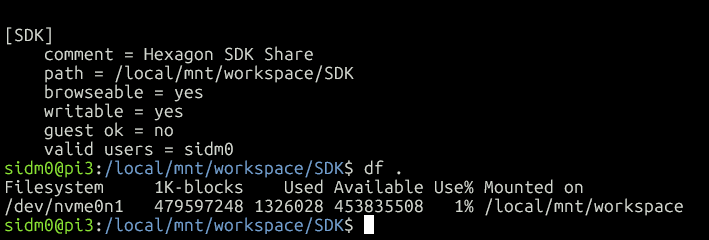
SAMBA

Setup On Windows Machine (Assumes SDK is at c:\Qualcomm\Hexagon_SDK\6.5.0.0)

  • Mount the remote filesystem:
  • pushd \pi3\SDK

Now z: will map to pi3:/local/mnt/workspace/SDK. Could be a different letter:

Setup the SDK, run setup_sdk_env.cmd SDK is here c:\Qualcomm\Hexagon_SDK\6.5.0.0 on my system.

A trivial Makefile and example. Notice this Makefile is writing test.so to Z: the drive number will vary.

C:\Qualcomm\Hexagon_SDK\6.5.0.0\example>type Makefile
CC=C:\Qualcomm\Hexagon_SDK\6.5.0.0\tools\HEXAGON_Tools\19.0.07\Tools\bin\hexagon-clang
INC=C:\Qualcomm\Hexagon_SDK\6.5.0.0\incs -I C:\Qualcomm\Hexagon_SDK\6.5.0.0\incs\stddef
test.so: test.c
        $(CC) -I $(INC) -fpic test.c -shared  -o z:\$@

C:\Qualcomm\Hexagon_SDK\6.5.0.0\example>
C:\Qualcomm\Hexagon_SDK\6.5.0.0\example>type test.c
#include "HAP_farf.h"
int main() {
    FARF(ALWAYS, "hello world");
    return 0;
}

Copy SDK artifacts to the target:

copy C:\Qualcomm\Hexagon_SDK\6.5.0.0\libs\run_main_on_hexagon\ship\UbuntuARM_aarch64\run_main_on_hexagon z:
copy C:\Qualcomm\Hexagon_SDK\6.5.0.0\libs\run_main_on_hexagon\ship\hexagon_toolv86_v68\librun_main_on_hexagon_skel.so z:

Log in to the target and run the example:

sidm0@pi3:/local/mnt/workspace/SDK$ export DSP_LIBRARY_PATH=/local/mnt/workspace/SDK
sidm0@pi3:/local/mnt/workspace/SDK$ ./run_main_on_hexagon 3 test.so stack_size=0x50000
Attempting to run on unsigned PD on domain 3
RPC to Hexagon DSP with args: "test.so stack_size=0x50000 "
Successfully called main() on Hexagon DSP and received return value of 0.

Missing output, add a “farf” file: echo 0x1f > run_main_on_hexagon.farf

sidm0@pi3:/local/mnt/workspace/SDK$ ./run_main_on_hexagon 3 test.so stack_size=0x50000
Attempting to run on unsigned PD on domain 3
adsprpc:dsp: CDSP:fastrpc_uprocess.c:733:0x1185:516: fastrpc_uthread_create done for tidQ 0x982, tidA 24562 (/frpc/f05a73c0 run_main_on_hex), stack 0x00E985D0 (size 16384), prio 192
adsprpc:dsp: CDSP:mod_table.c:690:0x1181:516: open_mod_table_open_dynamic: Module run_main_on_hexagon_skel_handle_invoke opened with handle 0xe979f0
RPC to Hexagon DSP with args: "test.so stack_size=0x50000 "
adsprpc:dsp: CDSP:test.c:3:0x57f:516: hello world
Successfully called main() on Hexagon DSP and received return value of 0.
adsprpc:dsp: CDSP:fastrpc_uprocess.c:1124:0x1181:516: fastrpc_uprocess_listener_exit: waking listener

Now the hello world message is displayed.

This uses windows to build but you can get a copy of the hexagon tools for the UbuntuARM. It is easier to just build on target but you would still need the SDK artifacts listed to run programs.