davidt
October 28, 2025, 11:43pm
1
Hi folks, here is an odd problem with PCIe on the Rubik Pi. I have an AI acclerator (DeepX DX-M1) that I would like to test on the Rubik Pi, but it is not being recognized by the kernel / OS. I am running Ubuntu 24.04 on my Rubik Pi, plugged in my accelerator to the m.2 slot, and boot up. Here is the result of lspci:
ubuntu@ubuntu:~$ lspci
0000:00:00.0 PCI bridge: Qualcomm Technologies, Inc SM8250 PCIe Root Complex [Snapdragon 865/870 5G]
0000:01:00.0 USB controller: Renesas Technology Corp. uPD720201 USB 3.0 Host Controller (rev 03)
0001:00:00.0 PCI bridge: Qualcomm Technologies, Inc SM8250 PCIe Root Complex [Snapdragon 865/870 5G]
ubuntu@ubuntu:~$ uname -a
Linux ubuntu 6.8.0-1055-qcom #55 SMP PREEMPT_DYNAMIC Tue Oct 28 12:31:56 MST 2025 aarch64 aarch64 aarch64 GNU/Linux
However, if I place the accelerator in another device, and run lspci on that board, I can see that it is recognized properly:
liveuser@localhost-live:~$ sudo lspci
0000:00:00.0 PCI bridge: Rockchip Electronics Co., Ltd RK3588 (rev 01)
0000:01:00.0 Processing accelerators: DEEPX Co., Ltd. DX_M1 (rev 01)
0002:20:00.0 PCI bridge: Rockchip Electronics Co., Ltd RK3588 (rev 01)
0004:40:00.0 PCI bridge: Rockchip Electronics Co., Ltd RK3588 (rev 01)
0004:41:00.0 Ethernet controller: Realtek Semiconductor Co., Ltd. RTL8125 2.5GbE Controller (rev 05)
Obviously, the RK3588 device uses a different kernel, but I am simply showing this to demonstrate that the DeepX accelerator does work, and other devices recognize it, so perhaps there is some additional kernel or PCIe configuration needed on the Rubik Pi?
Anyone have some ideas? Thanks!
kinkin
October 29, 2025, 3:54am
2
Could you kindly share the pinout definition and any additional documentation for the DeepX DX-M1?
davidt
October 29, 2025, 9:07pm
3
rosh
October 29, 2025, 9:37pm
4
We only tested NVME SSD to connected to M.2 slot.
davidt
October 29, 2025, 10:09pm
5
Thanks @rosh - yes, I know how to build a kernel, do you have any ideas or hints of what might need to enabled?
Thanks!
rosh
October 29, 2025, 10:47pm
6
Above is the commit that we enabled the M.2 slot and works for NVME SSD.
davidt
October 29, 2025, 11:18pm
7
Thanks, I’ll compare that to Rockchip and other platforms that work with the device.
kinkin
October 31, 2025, 10:27am
8
Kindly flash the dtb.bin and then try again.查看分享
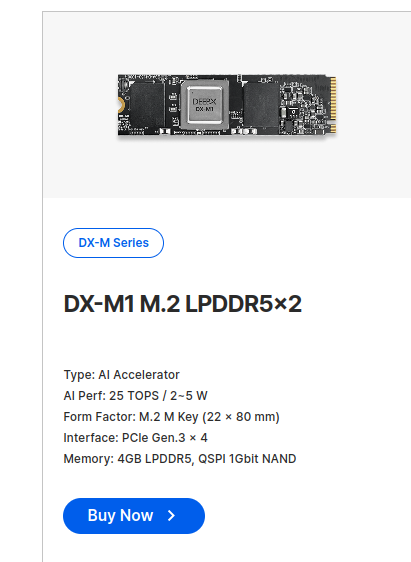
Additionally, did you purchase the model shown in the photo from the link below? If not, kindly share the purchase link you used.
davidt
October 31, 2025, 4:26pm
9
Yes, that is the correct device @kinkin . I purchased it here: https://www.digikey.com/en/products/detail/deepx/DX-M1BNM5604/26858313
Today I will try to use the new dtb.bin that you prepared and let you know the results, thanks for creating it!
davidt
November 1, 2025, 5:41pm
10
That worked! Thank you @kinkin !
ubuntu@192.168.0.73's password:
Welcome to Ubuntu 24.04.3 LTS (GNU/Linux 6.8.0-1054-qcom aarch64)

 * Documentation:  https://help.ubuntu.com
 * Management:     https://landscape.canonical.com
 * Support:        https://ubuntu.com/pro

 System information as of Sat Nov  1 17:37:03 UTC 2025

  System load:  0.06               Temperature:            48.0 C
  Usage of /:   2.5% of 111.98GB   Processes:              316
  Memory usage: 5%                 Users logged in:        0
  Swap usage:   0%                 IPv4 address for wlan0: 192.168.0.73


The list of available updates is more than a week old.
To check for new updates run: sudo apt update

ubuntu@ubuntu:~$ uname -a
Linux ubuntu 6.8.0-1054-qcom #54oem5-Ubuntu SMP PREEMPT_DYNAMIC Thu Sep 11 16:39:35 UTC 2025 aarch64 aarch64 aarch64 GNU/Linux
ubuntu@ubuntu:~$ lspci
0000:00:00.0 PCI bridge: Qualcomm Technologies, Inc SM8250 PCIe Root Complex [Snapdragon 865/870 5G]
0000:01:00.0 USB controller: Renesas Technology Corp. uPD720201 USB 3.0 Host Controller (rev 03)
0001:00:00.0 PCI bridge: Qualcomm Technologies, Inc SM8250 PCIe Root Complex [Snapdragon 865/870 5G]
0001:01:00.0 Processing accelerators: DEEPX Co., Ltd. DX_M1 (rev 01)
ubuntu@ubuntu:~$
kinkin
November 3, 2025, 6:10am
11
Glad to hear it!
1 Like

 Thank you for sharing.