Received v14 boards with 24.0.2/4 - No HDMI

Any clues why HDMI isn’t working out of the box on the v14 boards I just received?

Console shows they were shipped with:
lsb_release -a
No LSB modules are available.
Distributor ID: Ubuntu
Description: Ubuntu 24.04.2 LTS
Release: 24.04
Codename: noble

Thank you

HDMI OUT will appear approximately one minute after power-on.
Does the device boot up successfully?
Is it accessible via ADB?
Kindly provide a complete dmesg log.

Turns out, there is something incompatible with this particular display (1920x720 wide field of view). If I use another FHD display it is fine with 24.0.2. I tried other OS, and when I boot with Qualcomm linux 1.3, the 720 display works fine though. It just isn’t working with Debian 13 or the Ubuntu 24.0.2 load.

This is a known issue, and we will address it in the future release.

Yes, I had the same problem with it when I updated the board, got no image.
I grabbed an old HD square monitor from the closet and it worked fine.

Is there a release to address this issue yet?

The issue has been resolved and will be included in the next release.
Should you require an immediate fix, we can provide a patch at your request.

Hi,

A very quick - fix would be very welcome for me too.
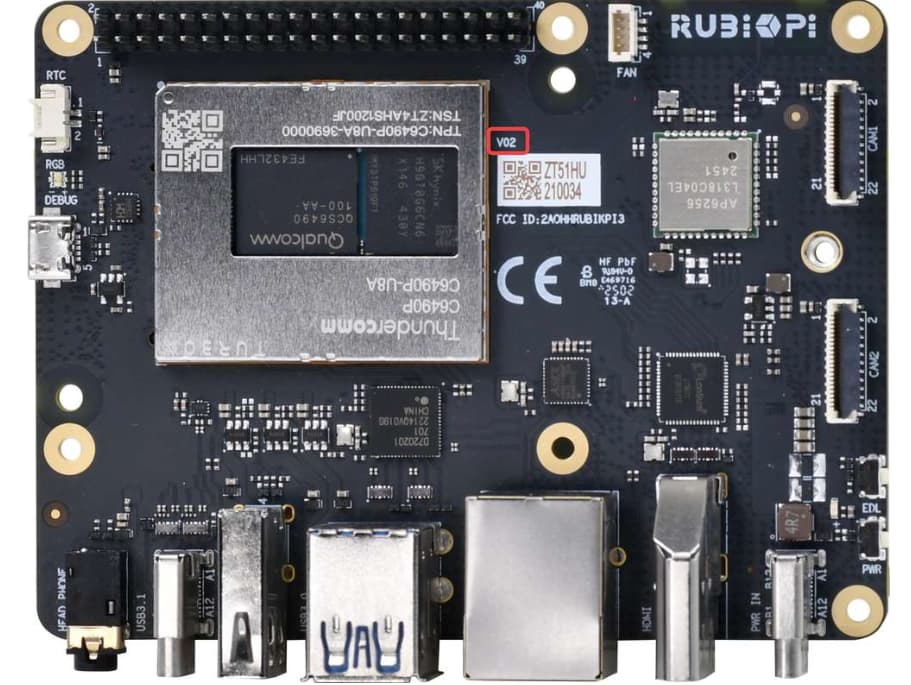
Actually, how to check board version ?
I have HDMI working properly with qualcomm linux 1.1.1, yet it’s not available for me in ubuntu, in current debian (older one works until update) and ubuntu.

Cheers, Michał

  1. You can check the board version here.
  2. Please apply the following patch and try again.
    ~canonical-kernel/ubuntu/+source/linux-qcom/+git/noble - [no description]
    ~canonical-kernel/ubuntu/+source/linux-qcom/+git/noble - [no description]

Thanks, I’ll try it today.
Looking at the git message, it improves 4k…
I have attempted connection to following monitors, and none was showing anything from my Rubik (their native resolutions, connection over native HDMI, no converters):

  • 2560x1440
  • 1920x1200
  • 1024x600

Also, tried connection through KVM, but this was unsuccessful also with “old” qualcomm linux, which works without kvm

Cheers,
Michał

May I confirm the current situation:
Displays with resolutions of 2560×1440, 1920×1200, and 1024×600 work perfectly under the Linux release, but there is no output under Ubuntu and Debian—even after applying the two patches mentioned above. Is this correct?
Could you please provide the dmesg log for further analysis?

Not really.
Did you try the patches?
What’s the kernel version you’re using?

Hi,

@Rosh:
For the quick answer: Yes.
Please disregard my previous statement, as devicetree change did not get saved.

Now… looking at the documentation here:

It would have been nice if someone from Thundercomm would try to follow it (both for cross and native) the path provided verbatim to identify gaps, as in both cases there are steps missing

  • packages installed
  • wrong/nonexistent path for (menu)config, and lack of easier hint: fakeroot debian/rules editconfigs
  • /boot symlinks (after grub.cfg evaluation - useless)
  • grub configuration

Cheers,
Michał

@kinkin

It works with qualcomm linux 1.1.1, but not 1.2, on monitor Dell 1920x1200, not tried other - as it worked. When it stopped working, I tried other monitors. Now I have it still connected to 1920x1200, can easily connect to 1024x600, but I’d prefer to avoid reflashing to 1.1.1 as I do have some work to do… and prefer to stick to one system (preferably ubuntu) if possible.

It worked with debian published around qualcomm linux 1.1.1, but not after updates, there was no ubuntu available at that time.

I can provide dmesg from “not working” as attachment, too long to paste. contact me with my work email (unchanged).

Having the change in-place, with quite up-to-date ubuntu 1920x1200 monitor works, 1024x600 not.
It’s a touchscreen HDMI+USB, dmesg upon connection:
[ 659.780775] usb 3-1: new full-speed USB device number 2 using xhci-hcd
[ 659.913292] usb 3-1: New USB device found, idVendor=1a86, idProduct=e5e3, bcdDevice= 0.00
[ 659.913336] usb 3-1: New USB device strings: Mfr=1, Product=2, SerialNumber=0
[ 659.913353] usb 3-1: Product: USB2IIC_CTP_CONTROL
[ 659.913368] usb 3-1: Manufacturer: wch.cn
[ 659.928138] input: wch.cn USB2IIC_CTP_CONTROL as /devices/platform/soc@0/8c00000.usb/xhci-hcd.0.auto/usb3/3-1/3-1:1.0/0003:1A86:E5E3.0004/input/input11
[ 659.981780] hid-multitouch 0003:1A86:E5E3.0004: input,hidraw2: USB HID v1.00 Device [wch.cn USB2IIC_CTP_CONTROL] on usb-xhci-hcd.0.auto-1/input0
[ 662.228916] lt9611 9-0039: hdmi cable connected
[ 666.350384] lt9611 9-0039: video check: hactive_a=0, hactive_b=0, vactive=480, v_total=525, h_total_sysclk=858
[ 667.394198] msm_vidc: fw: <VFW_E:HostDr:unkn:--------:–> VenusHostDriver_ParseC2Command(928): QC_IMAGE_VERSION_STRING=video-firmware.2.4.2-1bb9d0b4565acc9b6c035192fdacbad5a65effbf
[ 667.394218] msm_vidc: fw: <VFW_E:HostDr:unkn:--------:–> VenusHostDriver_ParseC2Command(929): IMAGE_VARIANT_STRING=PROD
[ 667.394227] msm_vidc: fw: <VFW_E:HostDr:unkn:--------:–> VenusHostDriver_ParseC2Command(930): OEM_IMAGE_VERSION_STRING=hw-rahutrip-hyd
[ 667.394234] msm_vidc: fw: <VFW_E:HostDr:unkn:--------:–> VenusHostDriver_ParseC2Command(931): BUILD_TIME: Nov 12 2024 11:44:20
[ 667.395327] msm_vidc: fw: <VFW_E:HostDr:unkn:--------:–> VenusHostDriver_ParseC2Command(928): QC_IMAGE_VERSION_STRING=video-firmware.2.4.2-1bb9d0b4565acc9b6c035192fdacbad5a65effbf
[ 667.395358] msm_vidc: fw: <VFW_E:HostDr:unkn:--------:–> VenusHostDriver_ParseC2Command(929): IMAGE_VARIANT_STRING=PROD
[ 667.395372] msm_vidc: fw: <VFW_E:HostDr:unkn:--------:–> VenusHostDriver_ParseC2Command(930): OEM_IMAGE_VERSION_STRING=hw-rahutrip-hyd
[ 667.395386] msm_vidc: fw: <VFW_E:HostDr:unkn:--------:–> VenusHostDriver_ParseC2Command(931): BUILD_TIME: Nov 12 2024 11:44:20
[ 667.413820] msm_vidc: fw: <VFW_E:HostDr:unkn:--------:–> VenusHostDriver_ParseC2Command(928): QC_IMAGE_VERSION_STRING=video-firmware.2.4.2-1bb9d0b4565acc9b6c035192fdacbad5a65effbf
[ 667.413924] msm_vidc: fw: <VFW_E:HostDr:unkn:--------:–> VenusHostDriver_ParseC2Command(929): IMAGE_VARIANT_STRING=PROD
[ 667.413941] msm_vidc: fw: <VFW_E:HostDr:unkn:--------:–> VenusHostDriver_ParseC2Command(930): OEM_IMAGE_VERSION_STRING=hw-rahutrip-hyd
[ 667.413956] msm_vidc: fw: <VFW_E:HostDr:unkn:--------:–> VenusHostDriver_ParseC2Command(931): BUILD_TIME: Nov 12 2024 11:44:20
[ 667.415408] msm_vidc: fw: <VFW_E:HostDr:unkn:--------:–> VenusHostDriver_ParseC2Command(928): QC_IMAGE_VERSION_STRING=video-firmware.2.4.2-1bb9d0b4565acc9b6c035192fdacbad5a65effbf
[ 667.415427] msm_vidc: fw: <VFW_E:HostDr:unkn:--------:–> VenusHostDriver_ParseC2Command(929): IMAGE_VARIANT_STRING=PROD
[ 667.415434] msm_vidc: fw: <VFW_E:HostDr:unkn:--------:–> VenusHostDriver_ParseC2Command(930): OEM_IMAGE_VERSION_STRING=hw-rahutrip-hyd

Cheers,
Michał

Please run the following commands and reboot before retesting; this version has been verified by us.

sudo dpkg -i *.deb 
sudo reboot

File:linux-image-…m64.deb
Link:查看分享
Password:mtq3
Expiry:2025-11-20 19:23:51

File:linux-module…m64.deb
Link:查看分享
Password:ddam
Expiry:2025-11-20 19:24:26

Hi,

thanks for build attached
1920x1200 - still works
1024x600 - still doesn’t shw image

However, (with my build as well as yours) after connection to smaller res and switch to higher, 1024x600 was presented on “big” monitor.

I was suspecting USB power supply for this small monitor, but it’s not that.
I kept USB of small one connected to Rubik, and touch doesn’t work.

Supposedly, this is the touch:

Bus 003 Device 002: ID 1a86:e5e3 QinHeng Electronics USB2IIC_CTP_CONTROL
Couldn’t open device, some information will be missing
Device Descriptor:
bLength 18
bDescriptorType 1
bcdUSB 0.01
bDeviceClass 0 [unknown]
bDeviceSubClass 0 [unknown]
bDeviceProtocol 0
bMaxPacketSize0 64
idVendor 0x1a86 QinHeng Electronics
idProduct 0xe5e3 USB2IIC_CTP_CONTROL
bcdDevice 0.00
iManufacturer 1 wch.cn
iProduct 2 USB2IIC_CTP_CONTROL
iSerial 0
bNumConfigurations 1
Configuration Descriptor:
bLength 9
bDescriptorType 2
wTotalLength 0x0022
bNumInterfaces 1
bConfigurationValue 1
iConfiguration 0
bmAttributes 0x80
(Bus Powered)
MaxPower 64mA
Interface Descriptor:
bLength 9
bDescriptorType 4
bInterfaceNumber 0
bAlternateSetting 0
bNumEndpoints 1
bInterfaceClass 3 Human Interface Device
bInterfaceSubClass 0 [unknown]
bInterfaceProtocol 0
iInterface 0
HID Device Descriptor:
bLength 9
bDescriptorType 33
bcdHID 1.00
bCountryCode 0 Not supported
bNumDescriptors 1
bDescriptorType 34 Report
wDescriptorLength 455
Report Descriptors:
** UNAVAILABLE **
Endpoint Descriptor:
bLength 7
bDescriptorType 5
bEndpointAddress 0x82 EP 2 IN
bmAttributes 3
Transfer Type Interrupt
Synch Type None
Usage Type Data
wMaxPacketSize 0x0040 1x 64 bytes
bInterval 1

With USB connected to Rubik and HDMI to raspberry I do see screen of Raspberry.

Michał

May I confirm whether you are using this display? If not, please kindly share the detailed specifications of your monitor.

Hi,

Purchased not from this offer, yet I think it’s this one, 10.1" version.

Michał

Just more details from where touch is working:
lsusb -t:
Port 004: Dev 003, If 0, Class=Vendor Specific Class, Driver=[none], 12M

lsusb -vvv -d 1a86:e5e3

Bus 001 Device 004: ID 1a86:e5e3 QinHeng Electronics USB2IIC_CTP_CONTROL
Negotiated speed: Full Speed (12Mbps)
Device Descriptor:
bLength 18
bDescriptorType 1
bcdUSB 0.01
bDeviceClass 0 [unknown]
bDeviceSubClass 0 [unknown]
bDeviceProtocol 0
bMaxPacketSize0 64
idVendor 0x1a86 QinHeng Electronics
idProduct 0xe5e3 USB2IIC_CTP_CONTROL
bcdDevice 0.00
iManufacturer 1 wch.cn
iProduct 2 USB2IIC_CTP_CONTROL
iSerial 0
bNumConfigurations 1
Configuration Descriptor:
bLength 9
bDescriptorType 2
wTotalLength 0x0022
bNumInterfaces 1
bConfigurationValue 1
iConfiguration 0
bmAttributes 0x80
(Bus Powered)
MaxPower 64mA
Interface Descriptor:
bLength 9
bDescriptorType 4
bInterfaceNumber 0
bAlternateSetting 0
bNumEndpoints 1
bInterfaceClass 3 Human Interface Device
bInterfaceSubClass 0 [unknown]
bInterfaceProtocol 0
iInterface 0
HID Device Descriptor:
bLength 9
bDescriptorType 33
bcdHID 1.00
bCountryCode 0 Not supported
bNumDescriptors 1
bDescriptorType 34 (null)
wDescriptorLength 455
Report Descriptors:
** UNAVAILABLE **
Endpoint Descriptor:
bLength 7
bDescriptorType 5
bEndpointAddress 0x82 EP 2 IN
bmAttributes 3
Transfer Type Interrupt
Synch Type None
Usage Type Data
wMaxPacketSize 0x0040 1x 64 bytes
bInterval 1
can’t get debug descriptor: Resource temporarily unavailable
Device Status: 0x0000
(Bus Powered)

dmesg | grep -i “1a86:e5e3”:

[ 243.905633] [ T172] input: wch.cn USB2IIC_CTP_CONTROL as /devices/pci0000:00/0000:00:08.1/0000:05:00.3/usb1/1-2/1-2:1.0/0003:1A86:E5E3.0004/input/input32
[ 243.905834] [ T172] hid-multitouch 0003:1A86:E5E3.0004: input,hidraw3: USB HID v1.00 Device [wch.cn USB2IIC_CTP_CONTROL] on usb-0000:05:00.3-2/input0

Thank you for sharing.
May I confirm if the 10.1-inch display you just mentioned refers to this one?