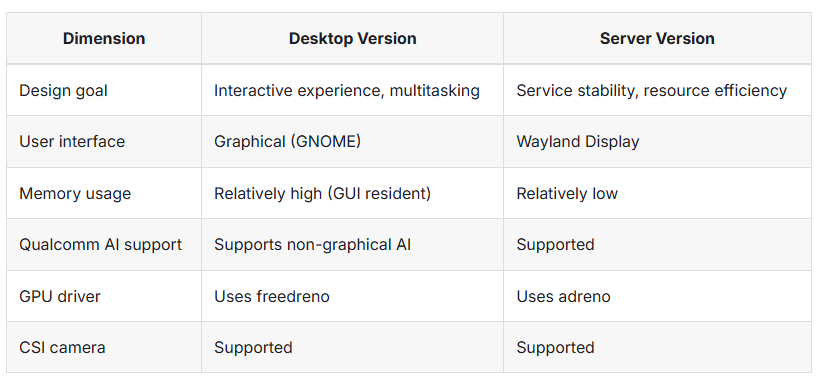
I am planning to use Rubik Pi for AI education purposes with students, and would like to understand the differences between the Ubuntu Desktop version and the Server version.
According to the Rubik Pi documentation, the Desktop version states “Qualcomm AI support – Supports non-graphical AI”, while the Server version states “Qualcomm AI support – Supported”. It would be helpful to have additional clarification on this distinction. Specifically, what is meant by “graphical AI”, and what features are not supported in the Desktop version?
In addition, the documentation indicates that the Desktop version “uses freedreno” for the GPU driver, while the Server version “uses adreno”. Do both the Desktop and Server versions support GPU acceleration for AI model inference?
“Graphical AI” (图形AI) refers to AI applications that require GPU-accelerated
graphics rendering as part of the AI pipeline. This includes:
- AI applications with real-time visual output (e.g., object detection
  overlays on video, pose estimation with skeleton rendering)
- GStreamer pipelines that use GPU-based rendering plugins like
  "waylandsink", "qtivtransform" (GPU color conversion/cropping),
  or "qtivcomposer" (GPU compositing)
- QDemo GUI applications that display AI inference results on screen
  with GPU-accelerated rendering
- Any AI pipeline that combines inference + real-time display using
  GPU shaders or OpenGL/Vulkan rendering
“Non-graphical AI” (非图形AI) refers to AI inference that does NOT require
GPU rendering for output:
- Command-line inference (e.g., running a TFLite model on NPU and
  printing results to terminal)
- Headless server-side AI processing (e.g., API-based inference)
- NPU-only inference via QNN/SNPE/LiteRT where results are saved
  to files or sent over network, not displayed on screen
- AI training or model optimization tasks
Q2. What features are NOT supported in the Desktop version?
The Desktop version uses the open-source “freedreno” (Mesa) GPU driver
instead of Qualcomm’s proprietary “Adreno” driver. This means:
NOT Supported in Desktop (freedreno):
-----------------------------------------------------------------
1. Qualcomm proprietary GPU compute (OpenCL via Qualcomm's driver)
   - Freedreno has limited OpenCL support compared to Adreno driver
   - QNN GPU backend may not work or have reduced performance

2. Hardware-accelerated video encode/decode via Qualcomm plugins
   - Some GStreamer IMSDK plugins that rely on proprietary GPU
     acceleration may not work properly
   - "qtivtransform" plugin (GPU color conversion) may fall back
     to CPU or not work

3. Full QDemo graphical experience
   - QDemo relies on GPU-accelerated GStreamer pipelines
   - The GUI rendering and real-time overlay features may not
     work correctly with freedreno

4. Zero-copy GPU pipeline
   - IMSDK's zero-copy architecture (GPU buffer sharing between
     plugins without CPU copy) requires the proprietary Adreno driver

Supported in Desktop (freedreno):
-----------------------------------------------------------------
1. Standard OpenGL ES / Vulkan rendering (for desktop UI)
   - Freedreno is a mature Mesa driver for basic GPU rendering
   - Desktop environment (GNOME/Wayland) works well

2. NPU-based AI inference (NOT affected by GPU driver choice)
   - QNN/SNPE NPU backend uses Hexagon DSP, NOT the GPU
   - LiteRT/TFLite with AI Engine Direct delegate on NPU works
   - ONNX Runtime with Qualcomm EP on NPU works

3. CPU-based AI inference
   - Standard TFLite CPU inference works
   - Llama.cpp CPU inference works (but GPU offload needs Adreno)