I am simply trying to setup my Rubik Pi per the user manual. However, after connecting via the UART terminal (using Windows) the passcode reset fails with ‘authentication token manipulation error’. I’m entering ubuntu as both the username and passcode, and they appear to be accepted. I’ve tried reflashing Ubuntu Desktop with QDL multiple times, but it hasn’t resolved the issue. Alternatively, I’ve also tried setting up Qualcomm Linux but the WiFi won’t setup with ‘An unexpected error occurred while configuring Wi-Fi. Please try again.’ If someone could help me resolve this that would be greatly appreciated. Perhaps less importantly, the QCM6490 USB device depicted in the setup guide doesn’t appear in Device Manager, despite the Micro-USB cable being recognized and the Rubik Pi in EDL mode.
1.We tested the Ubuntu Desktop version, and password reset works normally. Please try again.
It should be noted that password input must be successful on the first attempt, and cannot be deleted or modified. Also, the password must be at least 8 characters long.
ubuntu login: ubuntu
Password: ubuntu
Current password: ubuntu
New password: (your chosen password)
Retype new password: (your chosen password)
2.Did you use the command line to configure the Wi-Fi connection on the Linux version?
Please use the following command and try again: sudo nmcli dev wifi connect <WiFi-SSID> password <WiFi-password>
Please note that the username and password must be entered correctly on the first attempt, as deletion or modification is not allowed during input.
Additionally, please confirm that the password on the RUBIK Pi you are using has not been changed previously.
Thank you for the response, appreciate it.
Regarding Logs, this is a 1st login attempt and it fails so there will be no logs.
Regarding entering username and password correctly, yes i took care and made sure the com port connection was stable…
and yes this is a Rubik Pi i purchased long ago but only yesterday i opened it from its package and followed the instructions under the docs page.
I am sure this problem is faced by many, and it does not allow me to proceed further.
Is there any other way to hard reset and try again or something else.
Understood, thank you for providing the options, let me try and use this alternative, i was more interested in flashing android rather than Linux or ubuntu, so will figure out how to do that too
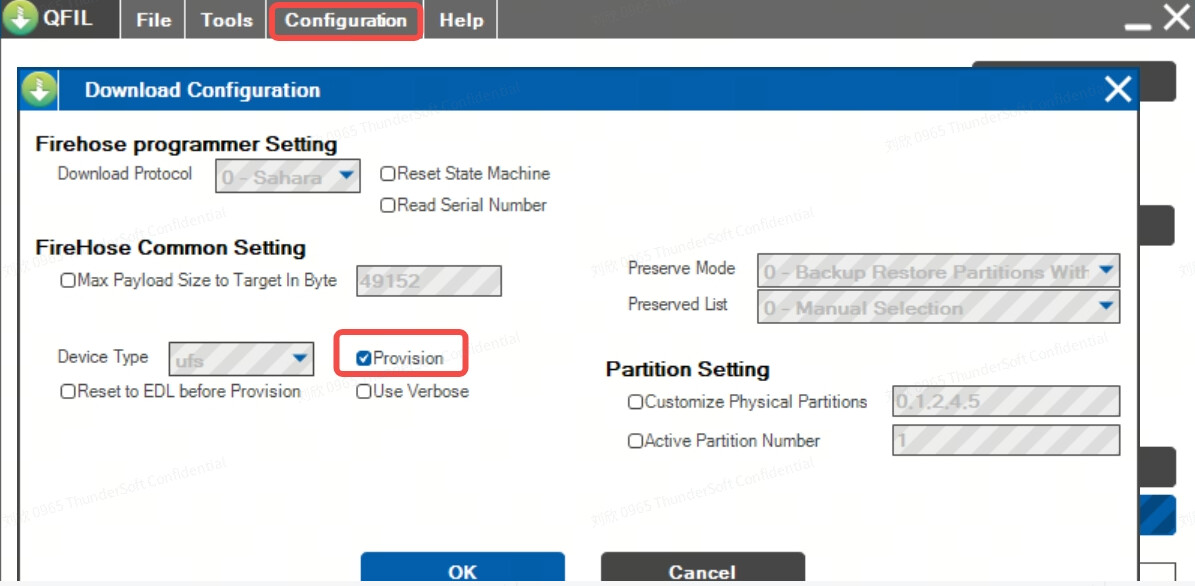
“If your RUBIK Pi 3 fails to boot up after flashing, enter the provision directory in the FlatBuild package and run the following command to try provisioning UFS.”
the RUBIK pi failed to boot,
i use QFIL to flash the device not QDL hence i am unable to execute the next steps
Lastly there mismatch in filename in doc vs actual downloads
BTW i want to build & deploy Android based solutions using Thundercomm support and SOMs
I also am a Hybrid Cloud Edge solution provider for Retail and Industrial customers under Tapas SmartEdge brand and my email address is vinay@tapasi.com
I am registered with Thundercomm in North America and that is how i purchased the Rubik PI
in a community post I learned that Thundercomm will support building and deploying Android AOSP only for Enterprise customers.
We have sent you an email containing the NDA and SLA agreement templates, along with corresponding confirmation emails. Could you please confirm whether you have received them?
If not, the emails may have been blocked by your corporate email security policy or marked as spam. Please kindly check your spam folder and confirm whether external attachments are allowed on your end. We can resend the documents via a cloud‑sharing link if required.